

No products
Multi Material Systems
- 3D Printing
- 3D Printers
- 3D Printer Parts
- Nozzles
- Hotends
- Extruders
- Bowden Tubes and Connectors
- Nozzle Wipers
- Filament Cutters
- Build Platforms and Parts
- 3D Printer Motherboards
- 3D Printer Displays
- Power Supply
- Motors and Parts
- Sensors, Limit Switches and Wires
- Fans and Parts
- Belts and Pulleys
- Bearings
- Structural Parts
- Filament Storage and Dryer
- Post Processing Equipment
- Multi Material Systems
- Multi Material Systems Parts
- Enclosure
- Lubricant
- Tools
- Print Kits
- Other
- 3D Filaments
- Resins
- 3D Scanners
- 3D Scanner Parts
- Machines
- CNC
- Manual
- CNC Parts
- Aluminum Extrusion
- Linear Shafts and Parts
- Linear Rails and Blocks
- Lead Screws and Parts
- Ball Screws and Parts
- Racks and Pinions
- Gears
- Bearings
- Couplings
- Belts
- Pulleys
- Belt Pulley Accessories
- Springs
- Screws Nuts Bolts
- Hardware
- CNC Controllers
- CNC Controller Parts
- CNC Motors and Drivers
- Power Supplies
- CNC Wires and Connectors
- Drag Chains
- Sensors and Switches
- Indicators
- Pneumatics, Water and Oil
- Dust Collectors
- Clamps
- Bits
- Plasma
- Lasers
- PLC and HMI
- Other
- Tools
- Power Tools
- Drills
- Rotary & Demolition Hammers
- Grinders
- Jigsaw
- Circular Saw
- Miter Saw
- Table Saw
- Electric Planer
- Trimmer and Router
- Electric Sander
- Electric Polisher
- Marble Cutter
- Cut Off Saw
- Welding Machine
- Air Compressors
- Electric Spray Gun
- High-Pressure Washer
- Air Blower
- Vacuum Cleaner
- Soldering Iron
- Heat Gun
- Glue Guns
- Electric Garden Tools
- Other Power Tools
- Cordless Tools
- Air Tools
- Hand Tools
- Measuring Tools
- Safety Tools
- Tool Accessories
- Power Tools
- Packaging
New products
-
-
-
-
Refurbished Creality K1 Max 3D Printer
Creality Authorized Reseller 12 Month Warranty Free Islandwide Delivery△
Rs 185,000.00 -
Creality Y Axis Motor Kit Assembly for K2 Plus
Rs 23,000.00 -
Creality X Axis Motor Kit Assembly for K2 Plus
Rs 23,000.00 -
Creality CR Touch Auto Bed Leveling Sensor
Rs 10,200.00 -
Anycubic PLA+ 3D Printer Filament 1.75mm 1kg
Rs 5,600.00 -
-
Bambu Lab Hotend Heating Assembly for H2D Right
Rs 12,400.00 -
-
Bambu Lab Hotend Heating Assembly for X2D Right
Rs 12,700.00
-
BIGTREETECH UPS 24V V1.0 for 3D Printers
Rs 1,950.00 -50% Rs 3,900.00
 View larger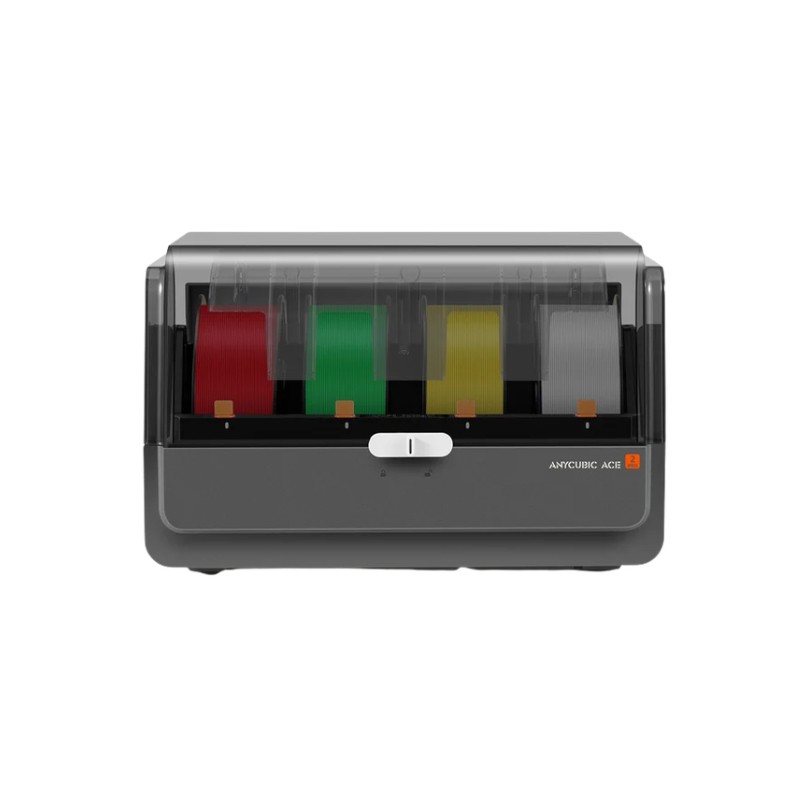
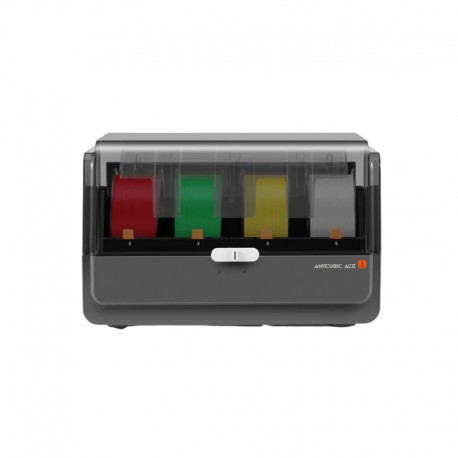
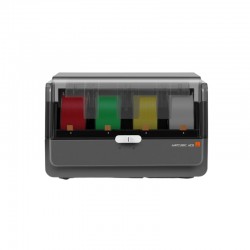
Anycubic ACE 2 Pro Multi-Color Material System for Kobra X and Kobra S1 Series
New product
This product is no longer in stock
- Remove this product from my favorite's list.
- Add this product to my list of favorites.
More info
The Anycubic ACE 2 Pro is an advanced four-spool automatic material system designed for multicolor printing, filament drying, protected storage, and intelligent filament management on compatible Anycubic FDM 3D printers.
This version is supplied with the connection accessories intended for the Anycubic Kobra X, Kobra S1, and Kobra S1 Max platforms.
Each ACE 2 Pro manages four filament spools using four independent brushless motors, automatically feeding, retracting, and switching filament during printing. In addition to multicolor printing, the system provides active drying up to 65°C, print-while-drying functionality, temperature and humidity monitoring, sealed filament storage, filament runout detection, automatic refill, and intelligent Anycubic filament recognition.
Key Features
Four-spool automatic multicolor material system
Designed for Kobra X and Kobra S1 Series
Four independent brushless feeding motors
Active filament drying up to 65°C
Supports printing while drying
Active temperature and humidity management
Enclosed filament storage
Filament runout detection and automatic refill
Intelligent Anycubic filament recognition
Expandable with multiple ACE 2 Pro units on supported printers
Four Independent Filament Channels
ACE 2 Pro contains four independent filament channels, allowing four compatible filament spools to remain loaded at the same time.
The printer can automatically select between these materials according to the sliced model.
This makes the system ideal for:
Multicolor figurines
Signs and logos
Color-coded prototypes
Decorative models
Educational models
Product samples
Personalized products
Multi-material projects
Filament changes are handled automatically rather than requiring manual spool changes during the print.
Four Independent Brushless Motors
ACE 2 Pro uses a separate brushless motor for each filament channel.
Each spool can therefore be managed independently during feeding and retraction.
This design improves control during:
Filament loading
Filament unloading
Color switching
Automatic material changes
Spool rewinding
Automatic refill
The independent motor system is one of the major improvements over the first-generation ACE Pro, which used two brushless motors.
New-Generation Feed and Retract Buffer System
ACE 2 Pro includes an upgraded filament feeding, retraction, and buffering mechanism.
The system helps compensate for filament movement between the ACE unit and printer while maintaining controlled feeding through the PTFE path.
This supports smoother automatic filament changes and more reliable operation during complex multicolor print jobs involving repeated material switching.
65°C Active Filament Drying
ACE 2 Pro incorporates an active drying system capable of reaching temperatures up to 65°C.
This allows compatible filament to be dried directly inside the material system without transferring the spool to a separate filament dryer.
Anycubic identifies the drying system as particularly suitable for:
PLA
PETG
TPU
PVB
Other compatible materials can also be dried, although the 65°C maximum temperature may not provide the ideal drying conditions required by some high-temperature engineering materials.
Print While Drying
Filament can remain inside the ACE 2 Pro and continue drying while the printer is operating.
This is particularly useful for moisture-sensitive materials because the filament remains in a controlled environment from storage through printing.
The workflow helps reduce repeated handling of spools and allows filament to be:
Stored
Dried
Monitored
Fed directly to the printer
without moving it between separate devices.
Active Moisture Control
ACE 2 Pro includes active humidity management rather than relying only on heating.
The system monitors:
Internal temperature
Internal humidity
and uses its airflow and moisture-control system during the drying process.
Temperature and humidity information can be viewed through supported Anycubic interfaces including the printer, slicing software, and Anycubic App.
Protected Filament Storage
The enclosed ACE 2 Pro housing helps reduce filament exposure to ambient humidity, dust, and other environmental contamination.
This is particularly useful when filament remains loaded for long periods between print jobs.
The enclosure includes sealing features but should not be considered completely airtight or vacuum sealed.
Intelligent Filament Recognition
ACE 2 Pro can automatically recognize compatible Anycubic filament equipped with the appropriate identification technology.
With supported Anycubic filament, the system can identify relevant filament information and simplify material setup.
Automatic identification requires compatible Anycubic proprietary filament and an internet connection.
Third-party 1.75mm filament can still be used, but material information may need to be selected manually.
Filament Runout Detection
ACE 2 Pro can detect when an active filament spool runs out.
This helps prevent a printer from continuing without material and supports automatic refill functionality when another compatible spool has been configured.
Automatic Filament Refill
Multiple channels can be loaded with matching material profiles.
If the active spool becomes empty, a compatible printer setup can automatically continue from another spool containing the same configured filament.
This is useful for:
Large prints
Long unattended jobs
Production printing
Print farms
Finishing partially used spools
Remaining Filament Estimation
ACE 2 Pro can estimate the amount of filament remaining on a spool.
This gives users a convenient indication of available material before starting larger prints.
Remaining-filament information is an estimate and can vary depending on spool type, winding, and filament configuration.
Alumina Ceramic Filament Feeding Ports
The filament feeding path uses wear-resistant alumina ceramic contact surfaces.
These help withstand repeated filament movement through the ACE system and provide improved durability when working with compatible abrasive materials.
Supported Filaments
Anycubic currently lists ACE 2 Pro support for compatible 1.75mm filament including:
PLA
PETG
ABS
ASA
PET
PA
PC
PVA when dry
BVOH when dry
PP
POM
HIPS
PLA-CF
PETG-CF
PAHT-CF
PVB
Flexible filament compatibility depends on the specific material and printer feeding system.
Very soft TPU and similar highly flexible materials should not automatically be assumed compatible simply because the filament diameter is 1.75mm.
Standard Spool Compatibility
ACE 2 Pro is designed primarily for standard filament spools within the following dimensions:
| Spool Specification | Supported Size |
|---|---|
| Flange Diameter | 195–200mm |
| Spool Width | 60–68mm |
| Flange Thickness | 3–6mm |
| Filament Diameter | 1.75mm |
Spools outside these dimensions may not feed or rewind correctly.
Kobra X Compatibility
ACE 2 Pro is officially supported by the Anycubic Kobra X.
The Kobra X uses Anycubic's newer multicolor architecture and supports expansion with multiple ACE 2 Pro units.
Current Kobra X firmware includes ACE 2 Pro support from the factory.
The Kobra X platform can be expanded to a maximum of 19-color printing with the appropriate multi-ACE configuration and additional filament hubs.
The first-generation ACE Pro is not compatible with the Kobra X.
Kobra S1 Compatibility
ACE 2 Pro is also compatible with the Anycubic Kobra S1.
For the standard Kobra S1, Anycubic specifies:
Firmware update required
Appropriate ACE 2 Pro signal adapter cable required
Multi-Color Material Retraction Module required for standalone Kobra S1 configurations
Current Anycubic guidance specifies Kobra S1 firmware version V2.7.0.7 for ACE 2 Pro support.
Users upgrading an existing Kobra S1 should therefore confirm that the printer firmware and connection accessories are updated before installation.
Kobra S1 Max Compatibility
The Anycubic Kobra S1 Max is designed to work with ACE 2 Pro.
Current Kobra S1 Max firmware provides ACE 2 Pro support from the factory.
The platform supports multiple ACE 2 Pro units and can be expanded to a maximum of 16-color printing with the appropriate configuration.
This makes the ACE 2 Pro particularly useful for large-format multicolor projects on the S1 Max.
Multi-ACE Expansion
Compatible printers can connect multiple ACE 2 Pro units to increase the number of available filament channels.
Current Anycubic compatibility guidance lists:
| Printer | Maximum ACE 2 Pro Cascade |
|---|---|
| Kobra S1 | Up to 2 Units |
| Kobra S1 Max | Up to 4 Units |
| Kobra X | Up to 4 Units |
Actual total color capability depends on the printer architecture, connected hubs, firmware, and complete material-routing configuration.
ACE Pro and ACE 2 Pro cannot be combined together within the same cascaded system.
Technical Specifications
| Specification | Details |
|---|---|
| Product Type | Automatic Multi-Color Material System |
| Brand | Anycubic |
| Model | ACE 2 Pro |
| Filament Channels | 4 |
| Filament Diameter | 1.75mm |
| Feeding Motors | 4 Independent Brushless Motors |
| Maximum Drying Temperature | 65°C |
| Print While Drying | Supported |
| Active Moisture Control | Supported |
| Enclosed Filament Storage | Supported |
| Temperature Monitoring | Supported |
| Humidity Monitoring | Supported |
| Intelligent Filament Identification | Supported |
| Filament Runout Detection | Supported |
| Automatic Filament Refill | Supported |
| Remaining Filament Estimation | Supported |
| Housing Material | ABS / PC |
| Machine Dimensions | 368 × 291.5 × 236.5mm |
| Machine Weight | Approx. 3.7kg |
| Package Dimensions | 445 × 345 × 320mm |
| Package Weight | Approx. 4.8kg |
| Maximum Power at 220V | 330W |
| Maximum Power at 110V | 235W |
ACE 2 Pro vs First-Generation ACE Pro
| Feature | ACE 2 Pro | ACE Pro |
|---|---|---|
| Filament Channels | 4 | 4 |
| Brushless Motors | 4 | 2 |
| Maximum Drying Temperature | 65°C | 55°C |
| Print While Drying | Yes | Yes |
| Active Moisture Control | Yes | No |
| Enclosed Storage | Yes | No |
| Temperature Monitoring | Yes | Yes |
| Humidity Monitoring | Yes | No |
| Filament Runout Detection | Yes | No |
| Automatic Filament Refill | Yes | Yes |
| Intelligent Filament Recognition | Yes | Yes |
| Kobra X Compatibility | Yes | No |
ACE Pro and ACE 2 Pro cannot be operated together in the same cascaded material system.
Applications
Four-color 3D printing
Expanded multicolor printing
Figurines and characters
Signs and logos
Decorative models
Product prototypes
Educational models
Color-coded components
Personalized products
Multi-material projects
Large multicolor models
Print farm operation
Long unattended prints
Filament drying
Protected filament storage
Compatibility
This package version is designed for:
Anycubic Kobra X
Anycubic Kobra S1
Anycubic Kobra S1 Max
It is supplied with the accessory set intended for the Kobra X / Kobra S1 Series installation.
Although ACE 2 Pro also supports selected Kobra 3 Series printers, those models use a different accessory configuration.
Package Includes
The Kobra X / Kobra S1 Series version currently includes:
1 × Anycubic ACE 2 Pro
1 × Power Cord
2 × Signal Cables – Cable A and Cable B
4 × PTFE Tubes
4 × Cable Clips
1 × Adapter Plate
1 × Return Detection Module with 4-in-1 Filament Hub
2 × M2.5×6 Screws
2 × M2.5×25 Screws
Package contents can vary with Anycubic production revisions, so the supplied accessories should be checked before installation.
Installation Requirements
Installation differs slightly between Kobra X, Kobra S1, and Kobra S1 Max.
Depending on the printer, setup can require:
Correct ACE 2 Pro signal cable
Adapter plate
Return / filament detection module
4-in-1 filament hub
PTFE tubes
Firmware update
Additional signal cables for cascading multiple ACE units
Always follow the installation procedure for the exact printer model.
Usage Note
ACE 2 Pro is designed for compatible Anycubic multicolor printers and is not a universal automatic material system for arbitrary FDM printers.
For reliable operation:
Use compatible 1.75mm filament
Confirm spool dimensions before loading
Keep PTFE tubes free from sharp bends
Regularly inspect PTFE tubes for wear
Keep drying-system air inlets and outlets unobstructed
Select the correct filament profile
Update printer firmware when required
Use the correct model-specific signal cable
Do not combine ACE Pro and ACE 2 Pro in the same system
When using moisture-sensitive filament, keeping the material inside the ACE 2 Pro during both drying and printing can help maintain more consistent material condition throughout the print.
8 other products in the same category:
-

Bambu Lab...
Rs 110,000.00
-

Bambu Lab...
Rs 60,000.00
-
Bambu Lab...
Rs 155,000.00
-
Bambu Lab...
Rs 10,400.00
-
Bambu Lab...
Rs 16,700.00
-
Bambu Lab...
Rs 15,900.00
-
Bambu Lab...
Rs 14,500.00
-
Anycubic...
Rs 108,000.00