
No products
Fans and Parts
- 3D Printing
- 3D Printers
- 3D Printer Parts
- Nozzles
- Hotends
- Extruders
- Bowden Tubes and Connectors
- Nozzle Wipers
- Filament Cutters
- Build Platforms and Parts
- 3D Printer Motherboards
- 3D Printer Displays
- Power Supply
- Motors and Parts
- Sensors, Limit Switches and Wires
- Fans and Parts
- Belts and Pulleys
- Bearings
- Structural Parts
- Filament Storage and Dryer
- Post Processing Equipment
- Multi Material Systems
- Multi Material Systems Parts
- Enclosure
- Lubricant and Thermal Grease
- Tools
- Print Kits
- Other
- 3D Filaments
- Resins
- 3D Scanners
- 3D Scanner Parts
- Machines and Parts
- CNC
- Manual
- CNC Parts
- Aluminum Extrusion
- Linear Shafts and Parts
- Linear Rails and Blocks
- Lead Screws and Parts
- Ball Screws and Parts
- Racks and Pinions
- Gears
- Bearings
- Couplings
- Belts
- Pulleys
- Belt Pulley Accessories
- Springs
- Screws Nuts Bolts
- Hardware
- CNC Controllers
- CNC Controller Parts
- CNC Motors and Drivers
- Power Supplies
- CNC Wires and Connectors
- Drag Chains
- Sensors and Switches
- Indicators
- Pneumatics, Water and Oil
- Dust Collectors
- Clamps
- Bits
- Plasma
- Lasers
- PLC and HMI
- Other
- Tools
- Power Tools
- Drills
- Rotary & Demolition Hammers
- Grinders
- Jigsaw
- Circular Saw
- Miter Saw
- Table Saw
- Electric Planer
- Trimmer and Router
- Electric Sander
- Electric Polisher
- Marble Cutter
- Cut Off Saw
- Welding Machine
- Air Compressors
- Electric Spray Gun
- High-Pressure Washer
- Air Blower
- Vacuum Cleaner
- Soldering Iron
- Heat Gun
- Glue Guns
- Electric Garden Tools
- Other Power Tools
- Cordless Tools
- Air Tools
- Hand Tools
- Measuring Tools
- Safety Tools
- Tool Accessories
- Power Tools
- Packaging
New products
-
-
-
Creality Hotend Cooling Fan for Ender 5 Max
Rs 1,800.00 -
Creality Hotend Cooling Fan for Hi Combo
Rs 2,500.00 -
-
-
-
Creality Brass Nozzle for Ender 5 Max
Rs 165.00 -
Creality Display Screen Kit for Ender 5 Max
Rs 21,200.00 -
-
Anycubic Kobra 3 Max V2 3D Printer
Anycubic Authorized Reseller 12 Month Warranty Free Islandwide Delivery
Rs 215,000.00 -
Anycubic Photon P1 Max Resin 3D Printer
Anycubic Authorized Reseller 12 Month Warranty Free Islandwide Delivery
Rs 420,000.00
-
Creality Red Metal Large Hand Twist Bed Leveling Nuts and Die Mold Springs 4pcs Kit
Original Spare Parts from Creality 3D...
Rs 750.00 -50% Rs 1,500.00
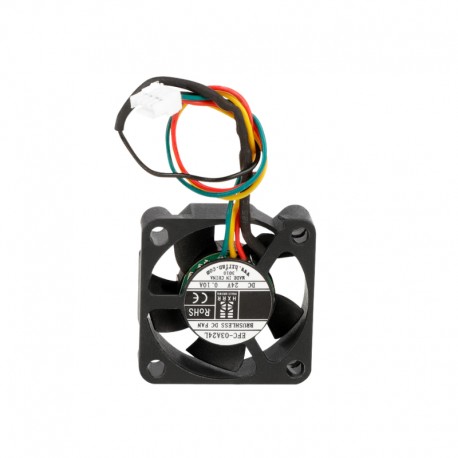
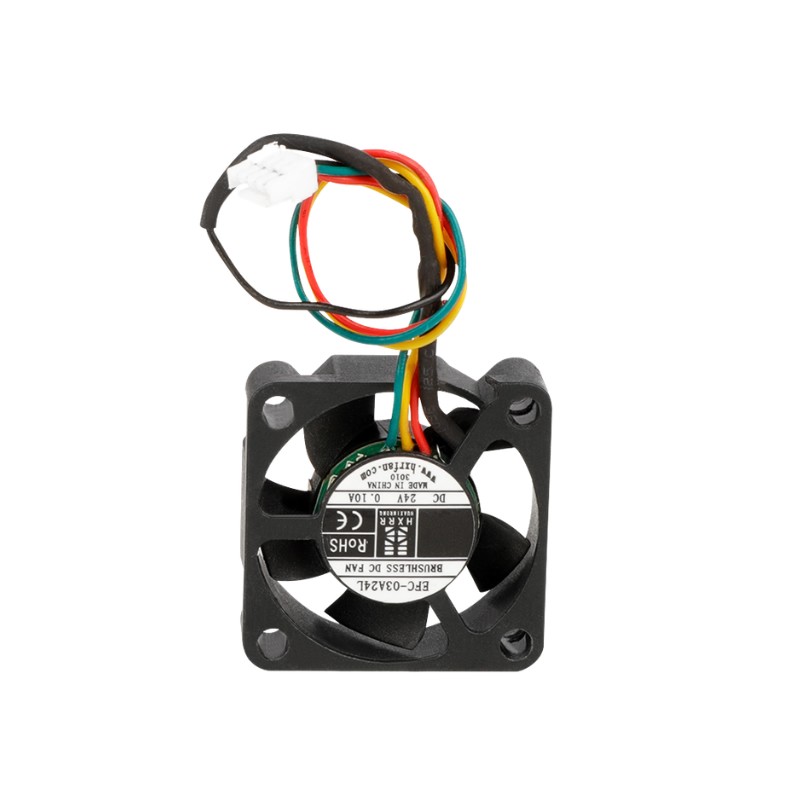
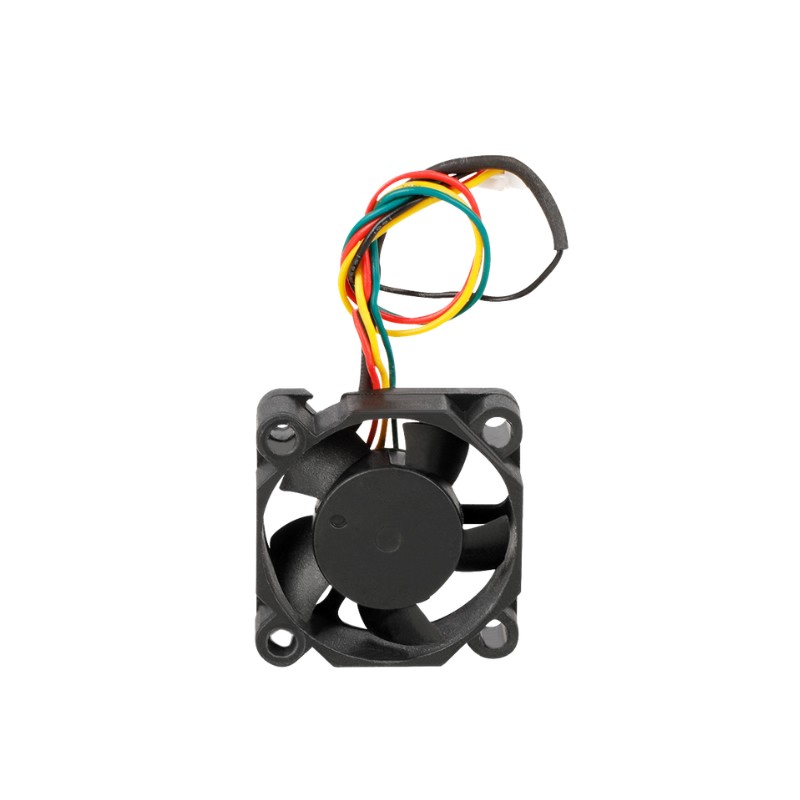
Creality Hotend Cooling Fan for K2 K2 Pro and K2 Plus
New product
- Remove this product from my favorite's list.
- Add this product to my list of favorites.
More info
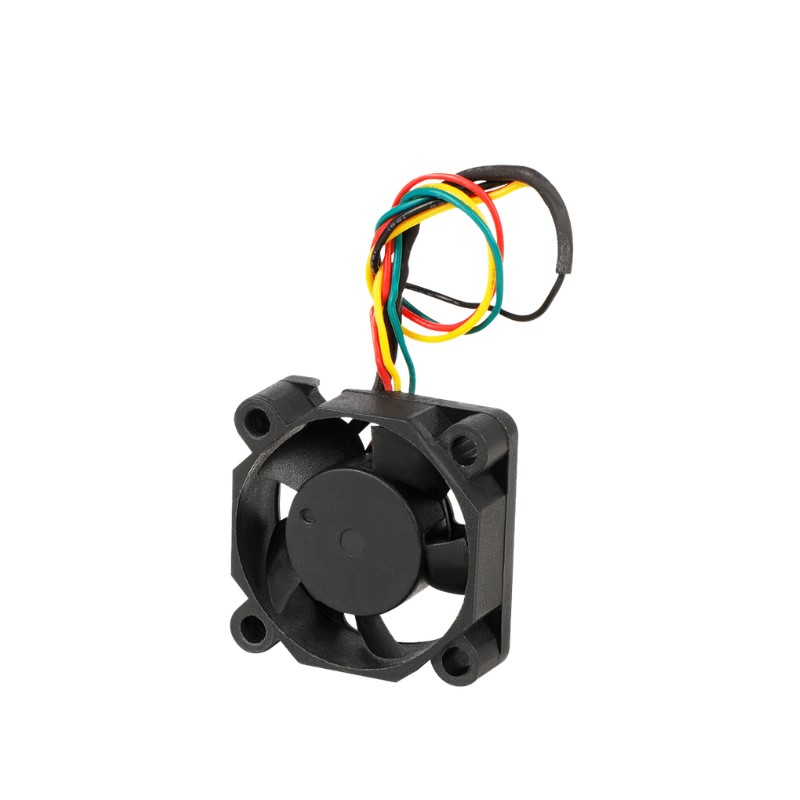
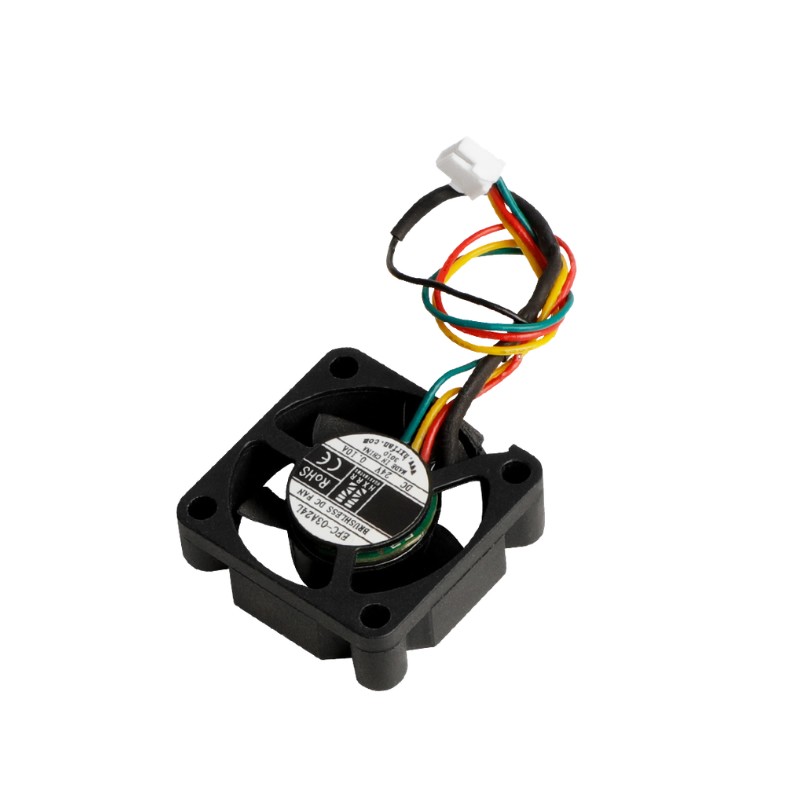
The Creality Hotend Cooling Fan for K2, K2 Pro, and K2 Plus is an original replacement axial fan designed to cool the hotend heatsink and heatbreak assembly. Featuring a compact 3010 design (30 × 30 × 10mm), 24V DC operation, and a rated speed of 12,000 RPM, it provides the airflow required to maintain proper thermal separation within the printer's hotend.
Also known as the Heat Break Cooling Fan, this component removes unwanted heat from the upper hotend assembly, helping prevent filament from softening prematurely before entering the melting zone. Effective cooling is particularly important during high-speed printing, extended printing jobs, and operation at elevated nozzle temperatures.
Identified by Creality part number 4004110136, this fan features an 85mm connection cable with a 4-pin connector. It is designed as a replacement for the original hotend cooling fan used in the Creality K2, K2 Pro, and K2 Plus series.
Key Features
Original Creality Replacement: Manufacturer part number 4004110136, designed for compatible K2-series printers.
3010 Axial Fan Design: Compact 30 × 30 × 10mm dimensions for installation inside the original printhead.
24V DC Operation: Matches the electrical requirements of the compatible hotend cooling system.
12,000 RPM Rated Speed: High-speed airflow supports effective heat dissipation from the hotend heatsink.
Heatbreak Cooling: Helps maintain the required temperature difference between the hotend's melting zone and filament-feeding pathway.
Heat Creep Prevention: Reduces the risk of premature filament softening, extrusion resistance, and heat-related clogs.
4-Pin Electrical Connection: Features an 85mm cable with the original 4-pin connection arrangement.
Model-Specific Replacement: Suitable for Creality K2, K2 Pro, K2 Plus, and their corresponding Combo configurations.
Efficient Hotend and Heatbreak Cooling
During FDM printing, the hotend must maintain two different temperature zones.
The lower section heats filament to its melting temperature, while the upper section must remain sufficiently cool to prevent filament from softening before reaching the intended melting chamber.
The Creality 3010 Hotend Cooling Fan directs airflow through the heatsink, removing unwanted heat from the heatbreak area.
This helps prevent heat creep, a condition where heat travels upward into the filament-feeding pathway and causes filament to soften prematurely.
Insufficient hotend cooling can contribute to:
Heat-related filament jams
Premature filament softening
Increased extrusion resistance
Inconsistent filament feeding
Repeated hotend clogging
Interrupted printing during extended jobs
Maintaining adequate airflow is especially important when printing at elevated nozzle temperatures or performing frequent filament changes.
Hotend Cooling Fan vs Other K2 Series Fans
The Creality K2 Series uses several different cooling fans within the printhead assembly.
Although these fans are installed close to one another, they perform different functions and are not interchangeable.
| Fan Type | Main Function |
|---|---|
| Hotend / Heatbreak Cooling Fan (3010) | Cools the hotend heatsink and prevents heat creep |
| Part Cooling Fan | Directs airflow toward freshly extruded filament |
| Extruder Motor Cooling Fan | Helps dissipate heat generated by the extruder motor |
This product is the 3010 axial hotend cooling fan, not the part cooling blower or extruder motor cooling fan.
If the fan responsible for cooling printed models, overhangs, and bridges is damaged, a compatible part cooling fan assembly is required instead.
Technical Specifications
| Specification | Details |
|---|---|
| Brand | Creality |
| Product Type | Hotend / Heatbreak Cooling Fan |
| Manufacturer Part Number | 4004110136 |
| Alternative Part Reference | 3205010420 |
| Fan Type | Brushless DC Axial Fan |
| Fan Model Marking | EFC-03A24L |
| Fan Size | 3010 |
| Dimensions | 30 × 30 × 10mm |
| Rated Voltage | 24V DC |
| Rated Current | 0.10A |
| Rated Speed | 12,000 RPM |
| Speed Tolerance | ±10% |
| Cable Length | Approximately 85mm |
| Electrical Connection | 4-Pin Connector |
| Number of Wires | 4 |
| Approximate Net Weight | 8g |
| Cooling Application | Hotend Heatsink / Heatbreak |
| Compatible Printers | Creality K2 / K2 Pro / K2 Plus |
| Quantity | 1pc |
Compatibility
This cooling fan is designed for the following 3D printers:
Creality K2
Creality K2 Combo
Creality K2 Pro
Creality K2 Pro Combo
Creality K2 Plus
Creality K2 Plus Combo
It is also listed as compatible with the Creality Sermoon M300.
Although other Creality printers may use similar 3010 fans operating at 24V, compatibility is not guaranteed by dimensions and voltage alone.
The connector, cable length, mounting arrangement, and electrical configuration must also match.
Before ordering, confirm that the replacement corresponds to Creality part number 4004110136.
When to Replace the Cooling Fan
The hotend cooling fan may require replacement when experiencing:
Fan not rotating during normal operation
Unusual rattling, grinding, or vibration
Broken or damaged fan blades
Intermittent fan operation
Reduced airflow caused by mechanical wear
Heatbreak cooling errors or fan-related warnings
Repeated filament jams associated with inadequate heatsink cooling
Similar symptoms may result from damaged wiring, loose connectors, or obstructed airflow.
Inspect the fan and its electrical connections before replacing the component.
Installation and Replacement
Creality provides model-specific heatbreak cooling fan replacement instructions for the K2 Series.
A typical replacement procedure involves:
Unload the filament and allow the hotend to cool completely.
Switch off the printer and disconnect its power supply.
Remove the printhead cover according to Creality's service instructions.
Locate the 3010 axial fan responsible for cooling the hotend heatsink.
Carefully disconnect the existing fan from its 4-pin connector.
Remove the mounting hardware and damaged fan.
Install the replacement fan in the original mounting position and airflow direction.
Route the cable securely and reconnect the electrical connector.
Reassemble the printhead, ensuring the fan blades rotate freely.
Power on the printer and verify normal cooling fan operation before printing.
Important: Maintain the original airflow direction during installation. Incorrect fan orientation can reduce heatsink cooling efficiency and contribute to heat creep.
Avoid operating the printer at printing temperatures if the hotend cooling fan is not functioning correctly.
Package Includes
1 × Original Creality Hotend Cooling Fan 3010 24V – 4004110136
The hotend, heatsink, part cooling fan, extruder motor cooling fan, and complete printhead assembly are not included.
Usage Note
This is the original Creality 4004110136 Heatbreak Cooling Fan, featuring a 30 × 30 × 10mm axial design, 24V operation, and a rated speed of 12,000 RPM.
It is specifically intended for cooling the hotend heatsink of the K2, K2 Pro, and K2 Plus series. It should not be confused with the separate part cooling or extruder motor cooling fans.
Before installation, confirm the original 4-pin connector, cable arrangement, and airflow direction.
30 other products in the same category:
-

Creality...
Rs 570.00
-

4010 Axial...
Rs 200.00
-
40x40mm Fan...
Rs 50.00
-

Creality...
Rs 2,100.00
-

Transparent...
Rs 570.00
-

4020 Axial...
Rs 250.00
-
4020 Turbo...
Rs 360.00
-

5010 Axial...
Rs 210.00
-

6015 Axial...
Rs 340.00
-

8025 Axial...
Rs 360.00
-

Bambu Lab...
Rs 5,200.00
-

Bambu Lab...
Rs 5,400.00
-
Creality...
Rs 1,100.00
-
3010 Axial...
Rs 270.00
-
Snapmaker...
Rs 3,800.00
-
Snapmaker...
Rs 3,800.00
-

120x120x25m...
Rs 1,400.00
-

Creality...
Rs 2,600.00
-
Creality...
Rs 2,600.00
-
Bambu Lab...
Rs 11,400.00
-
Bambu Lab...
Rs 4,900.00
-
Bambu Lab...
Rs 4,900.00
-
Bambu Lab...
Rs 4,900.00
-
Bambu Lab...
Rs 4,900.00
-
Bambu Lab...
Rs 4,900.00
-
Bambu Lab...
Rs 5,100.00
-
Bambu Lab...
Rs 5,100.00
-
Bambu Lab...
Rs 10,400.00
-
Creality...
Rs 2,500.00
-
Creality...
Rs 1,800.00